
AI Assistant
Talk through prompt ideas, references, structure, and creative direction in Prism before you start generating images or videos.
 Nano Banana
 Kling
Kling SeedanceSeedDream
 Veo
Veo Sora
Sora Flux
FluxUse Case
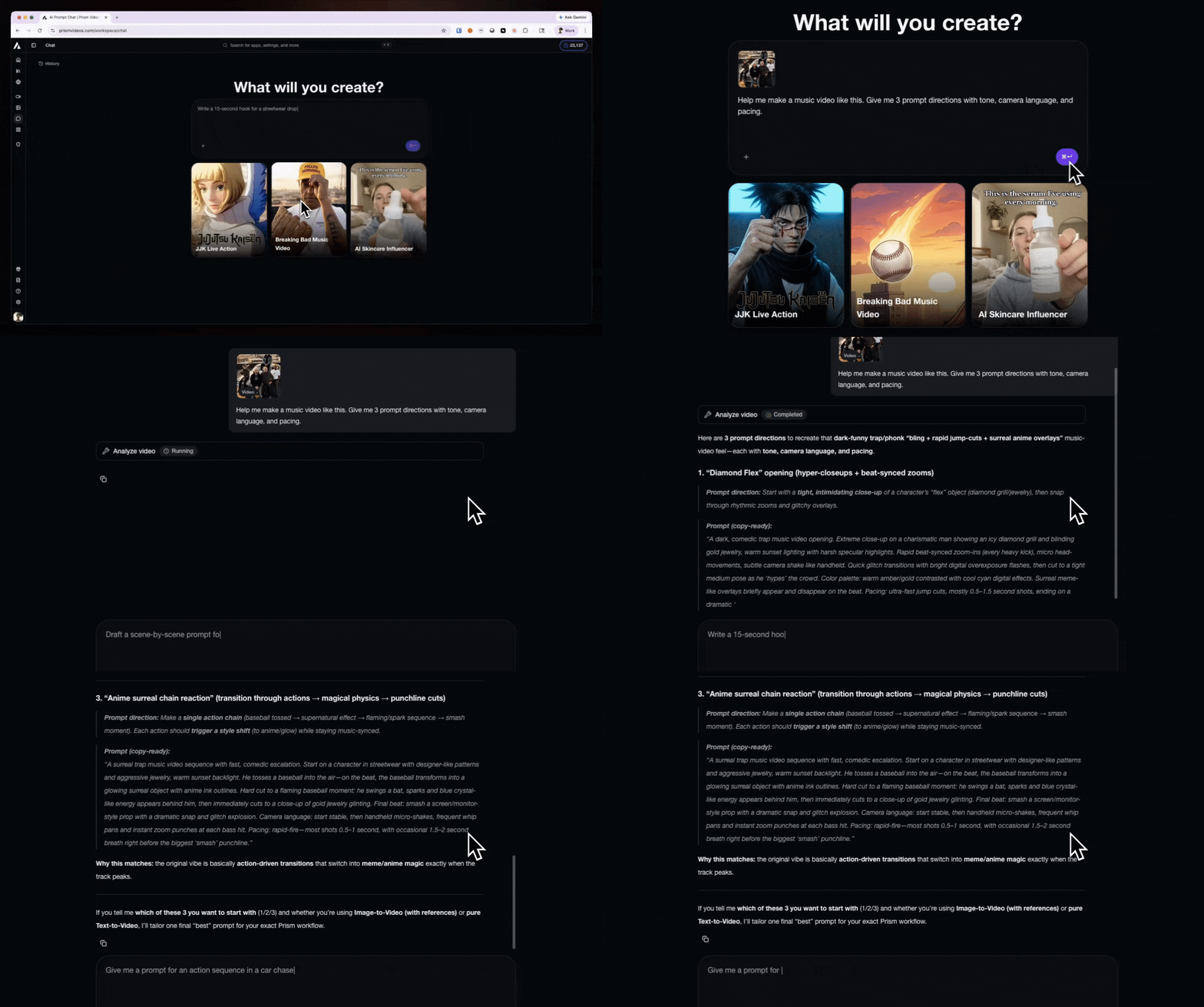
How do I Recreate this Video?
A user asks how to mimic a video, and Prism responds with the workflow, prompt direction, and next steps to use inside the product.
Showcase
Start a conversation
Pick a video and Prism’s AI Assistant will help you recreate it.
Pricing
Pick a plan and start creating
Prism plans are built around credits, model access, and how much AI video you want to ship each month.
Included credits per month
10 credits
- Basic video models
- Basic image models
- Limited generations per day
- Upscale models
- Story mode access
- Early access to new features
- Top up credits anytime
- Basic video models
- Basic image models
- Limited generations per day
- Upscale models
Unlimited Generations
- Nano Banana 2
- Nano Banana Pro
- Veo 3.1
- Veo 3.1 Fast
- Veo 3.1 Lite
Included credits per month
900 credits
- Access to all video models
- Access to all image models
- Unlimited generations per day
- Upscale models
- Story mode access
- Early access to new features
- Top up credits anytime
- Access to all video models
- Access to all image models
- Unlimited generations per day
- Upscale models
Unlimited Generations
- Nano Banana 2
- Nano Banana Pro
- Veo 3.1
- Veo 3.1 Fast
- Veo 3.1 Lite
Included credits per month
2,900 credits
- Access to all video models
- Access to all image models
- Unlimited generations per day
- Upscale models
- Story mode access
- Early access to new features
- Top up credits anytime
- Access to all video models
- Access to all image models
- Unlimited generations per day
- Upscale models
Unlimited Generations
- Nano Banana 2
- Nano Banana Pro
- Veo 3.1
- Veo 3.1 Fast
- Veo 3.1 Lite
Included credits per month
12,000 credits
- Access to all video models
- Access to all image models
- Unlimited generations per day
- Upscale models
- Story mode access
- Early access to new features
- Top up credits anytime
- Access to all video models
- Access to all image models
- Unlimited generations per day
- Upscale models
Unlimited Generations
- Nano Banana 2
- Nano Banana Pro
- Veo 3.1
- Veo 3.1 Fast
- Veo 3.1 Lite
Looking for an enterprise plan?
Need custom pricing, white-glove ad production, or dedicated support for your team?
Book a DemoHave Questions?
What is an AI prompt assistant for video creation?
Prism's AI assistant is a copilot you can use when you have prompt or workflow questions in Prism. You can upload a video you like and ask how to create it in Prism, and you can ask the assistant for suggestions about which prompts and models to use in Prism Chat.
How does Prism Chat help with AI video prompts?
Prism's AI assistant knows best practices for AI video prompting, including details like lighting, camera orientation, and color direction. It's a strong resource for writing better AI image and video prompts.
Can Prism Chat turn an idea into a shot list or creative plan?
Yes. Prism's AI assistant can take a long or multi-scene idea and turn it into scene-by-scene instructions.
Can Prism Chat help me choose the right AI model?
Yes. Prism's AI assistant knows the current model catalog, which models are better for different situations, and how pricing varies across options. It's a good resource for understanding which model to use.
Can Prism Chat help with UGC ads, hooks, and content ideas?
Yes. Prism's AI assistant can act as a creative partner when you're working on UGC ads, video hooks, and content ideas. You can also use it to review previous generations, ask for feedback, and figure out what to change next.
Ready to shape the idea before you generate?
Use Prism Chat to go from rough concept to a cleaner prompt, better structure, and faster production decisions.